Start With the Use Case, Not the Spec Sheet
The single most common mistake shoppers make when buying a portable fan is to start by browsing Amazon listings sorted by star rating. Ratings tell you how satisfied previous buyers were with their specific fan; they tell you almost nothing about whether that fan will suit your routine. A 4.7-star commuter fan may be miserable on a construction site, and a rugged camping fan can feel redundant on a desk.
Before you compare anything else, write down the answer to one question: where will this fan spend 80% of its working hours? The honest answer usually falls into one of four buckets:
- Commuting and travel — backpack, tote bag, train tray table, neck/desk mount
- Outdoor work — construction, surveying, film shoots, delivery routes
- Camping and overlanding — tent, cook station, vehicle camp
- Desk and home office — fixed location, longer runtime, lower noise priority
Each bucket changes which specs actually matter. A camper cares about hours of runtime far more than a desk user, who cares about dB at 1 m far more than anyone else. Once you lock the bucket, the spec sheet starts to read itself.
The Five Specifications That Actually Matter
Marketing pages love to print a dozen numbers. Most of them are noise. Here are the five you should actually compare, in order of impact.
1. RPM and Airflow (CFM)
Revolutions per minute (RPM) describe how fast the motor spins the impeller, but RPM alone is a misleading number. A high-RPM fan with a poorly shaped blade can move less air than a lower-RPM fan with a properly aerated impeller. The figure you really want is CFM (cubic feet per minute) at a given speed setting, ideally measured at the front grille.
For context:
| Use case | Useful CFM range (per fan) |
|---|---|
| Personal desk cooling | 60–120 CFM |
| Commuting / neck-level | 80–150 CFM |
| Outdoor work, full torso | 150–280 CFM |
| Tent or small cabin | 200–400 CFM |
If the brand doesn't publish a CFM figure, treat it as a warning sign. RPM alone, without blade diameter and pitch, is a vanity metric.
2. Battery Capacity (mAh) and Real-World Runtime
mAh tells you how much energy the battery stores, not how long the fan will actually run. Two fans with identical 4,000 mAh cells can have wildly different runtimes because motor efficiency, blade design, and speed-setting behavior all consume that energy differently.
The honest comparison is hours of runtime per speed setting, ideally tested at room temperature (around 25 °C / 77 °F). Expect manufacturer runtime claims to be measured at the lowest speed setting. If you run the fan on medium — which is what most people actually use — divide the headline number by roughly 1.6 to 2.0 to estimate reality.
3. Weight and Form Factor
Weight is non-negotiable for commuters and campers. The threshold numbers below are based on how the product feels when carried all day:
| Carry method | Comfortable upper weight |
|---|---|
| Pocket or lanyard | ≤ 180 g |
| Handheld or desk | ≤ 350 g |
| Backpack clip-on | ≤ 500 g |
| Tent or vehicle camp | ≤ 1,200 g |
Don't forget to account for charging cable and any base or stand in the listed weight. Some vendors quote weight without the base, which can add another 150–300 g you didn't budget for.
4. Sound Level (dB)
Decibel ratings are usually quoted at 1 m on the highest setting, which is the loudest the fan will ever be. For desk and shared-space use, what matters more is the dB reading on low and medium settings, since that's where you'll live 90% of the time.
| Setting | Typical dB range | Subjective feel |
|---|---|---|
| Low | 25–35 dB | Library-quiet |
| Medium | 35–50 dB | Soft conversation |
| High / Turbo | 50–70+ dB | Office background, noticeable whoosh |
A 10 dB increase is perceived as roughly a doubling of loudness. So the difference between a 40 dB and 50 dB fan is not "a little louder" — it's twice as loud to your ear.
5. Charging Time and Port Standard
A fan with a 6,000 mAh cell that takes 6 hours to charge over micro-USB is a usability problem, not a feature. Look for:
- USB-C input as the modern baseline
- Charging time stated in hours at a given wattage
- Pass-through charging if you intend to run it from a power bank
- PD or QC support if you already own fast-charging bricks
Power Architecture: Battery, Corded, or Hybrid
There are three power topologies in this category, and each carries trade-offs.
Pure battery units are the simplest. They're portable, sealed, and easy to use, but their runtime is capped by cell capacity. They're the right call for commuters and most campers.
Corded AC units offer unlimited runtime but tie you to a wall outlet. They're rarely "portable" in any meaningful sense — once you add the brick and the cable, you're dragging a small appliance, not carrying a fan.
Hybrid units accept both a removable battery and a USB-C / DC input. This is the most flexible architecture and the one we recommend for anyone whose use case isn't fixed. A hybrid unit can run cordless on a 5,000 mAh pack during a commute, then plug into a 20 V USB-PD source on a job site for an entire shift.
One practical note: hybrids are only as good as their power management firmware. A well-designed hybrid will gracefully throttle when the input can't sustain the requested speed. A poorly designed one will simply shut off the moment you plug it in. If reviews mention "doesn't work while charging," that's the firmware talking.
Build Quality: The Three Signals You Can Judge With Your Hands
You don't need to be an engineer to read build quality. There are three tactile and visual signals that consistently separate premium units from disposable ones.
Materials: ABS vs Polycarbonate
Most portable fans use either ABS plastic or a polycarbonate (PC) blend, sometimes both. ABS is cheaper, lighter, and adequate for indoor desk duty. Polycarbonate is tougher, more heat-resistant, and survives drops better. If a fan's housing feels slightly rubberized, you're likely holding a PC/ABS blend with a soft-touch coating — that's a good sign for outdoor work.
Avoid fans whose housings flex audibly when you squeeze the body. That flex usually means thin walls and inadequate internal ribbing, both of which shorten product life.
Button Feel
Press the buttons. They should feel tactile — a clean, unambiguous click — and the action should be consistent across all buttons. Mushy or inconsistent buttons suggest a low-grade membrane switch, which is usually the first component to fail on cheap fans.
Water and Dust Resistance
If the product page mentions an IP rating, look for the actual code (IPX4, IP54, etc.). "Splash-proof" and "water-resistant" without a code are marketing language, not engineering claims.
- IPX4: Survives splashes from any direction. Fine for outdoor work in light rain.
- IP54: Dust-protected and splash-resistant. Better choice for construction or trail work.
- IP65 or higher: Dust-tight and resistant to low-pressure water jets. Overkill for most, but welcome for marine or monsoon conditions.
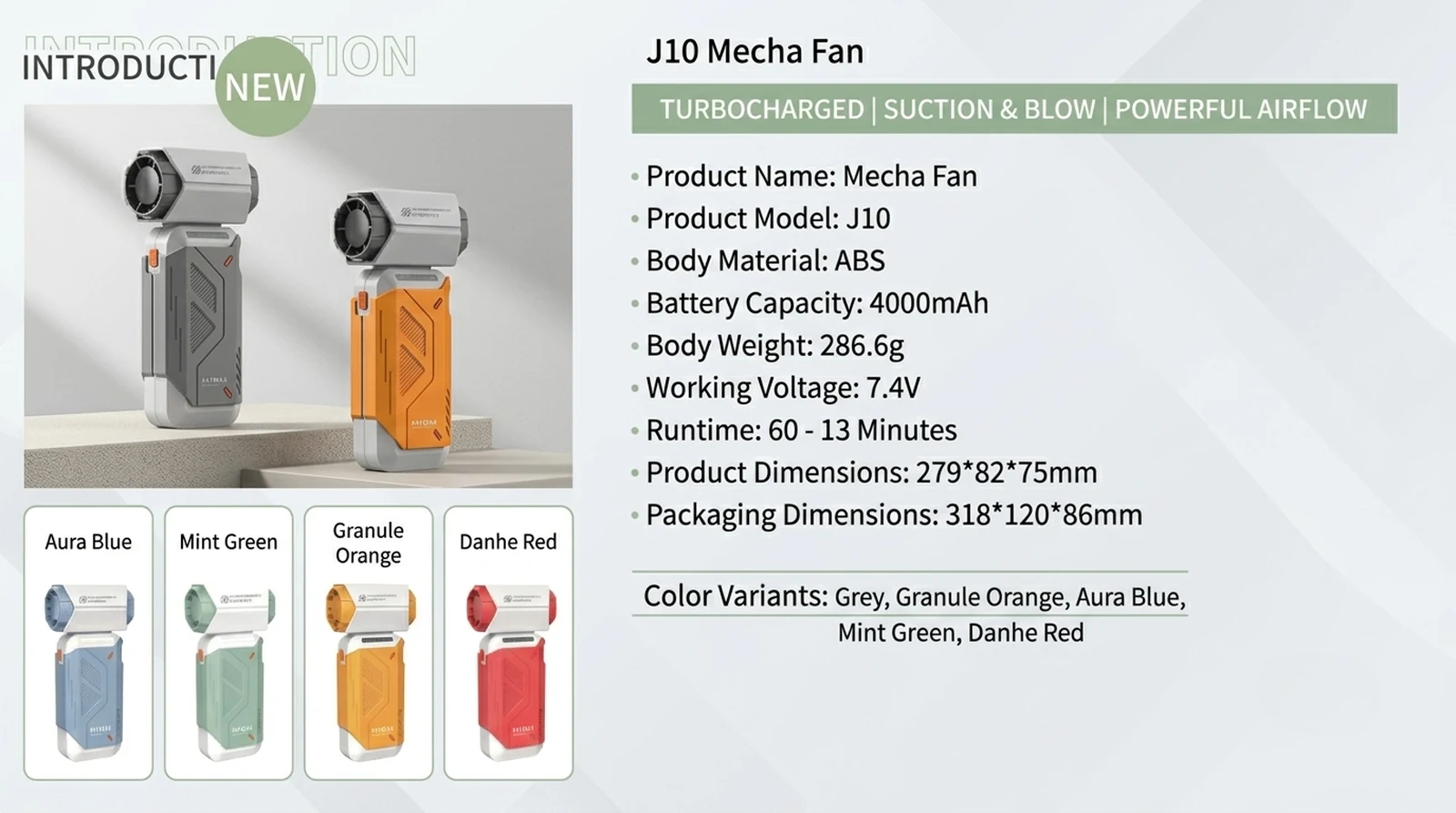
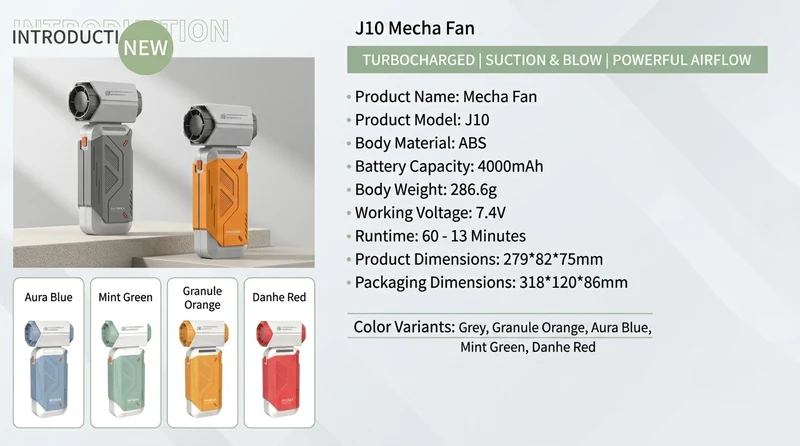
Representative products in this category — for example, the J10 Mecha Fan — tend to publish their IP code, cell chemistry, and a usable CFM range rather than just headline RPM. That posture is itself a quality signal.
Brand Red Flags Worth Walking Away From
The portable-fan category is crowded with white-label units that change model numbers every quarter. Here are four red flags that, individually, are concerning — and together, are a reason to keep scrolling.
- Vague or missing specs. If you can't find CFM, real-world runtime per speed, dB per speed, or charging wattage on the product page, the brand isn't measuring. Move on.
- No certifications listed. Look for FCC, CE, RoHS, and UN38.3 (the last one is the lithium-battery shipping certification). Reputable brands display these on a dedicated compliance page or in the product documentation.
- No factory or company background. "Designed in California, made in Asia" without a parent company, address, or verifiable history is a yellow flag. The portable-fan industry has a real manufacturing base; a brand that can't name its factory or OEM partner usually has a thin relationship with quality control.
- Same-looking SKUs across many storefronts. If the same fan appears under five different brand names on five different Amazon listings, you're looking at a white-label product with no committed after-sales support. Warranty claims become difficult when the brand doesn't exist as a legal entity.
Decision Checklist by Use Case
Below is a weighted checklist. Score each candidate fan 0–3 per line, then total. A score above 60 means the fan is well-matched; below 40 means you're forcing a square peg.
| Criterion (weight) | Commuter | Outdoor work | Camping | Desk |
|---|---|---|---|---|
| Weight under 400 g (×2) | 6 | 3 | 0 | 3 |
| Runtime ≥ 6 h on medium (×3) | 6 | 9 | 9 | 3 |
| CFM ≥ 150 (×2) | 3 | 6 | 6 | 0 |
| Noise ≤ 45 dB on medium (×2) | 6 | 3 | 0 | 6 |
| USB-C input with PD (×1) | 3 | 3 | 0 | 0 |
| IP rating ≥ IPX4 (×2) | 0 | 6 | 6 | 0 |
| Hybrid power (battery + DC) (×1) | 2 | 3 | 3 | 0 |
| Documented CFM and dB (×1) | 3 | 3 | 3 | 3 |
| Max possible | 29 | 36 | 27 | 15 |
If you're a commuter, weight and noise dominate. If you're doing outdoor work, runtime and CFM are your bottlenecks. If you're camping, weather sealing matters more than absolute loudness. For desk use, you can ignore weight almost entirely and focus on the noise curve.
Putting It All Together
A portable fan is one of those products where the right answer depends almost entirely on the question you're actually asking. Once you've named your dominant use case, the spec sheet shrinks from a wall of numbers to roughly five meaningful comparisons, and the marketing fluff falls away. Prefer brands that publish real measurements, document their certifications, and design for at least one hybrid power mode. Avoid listings that hide their numbers behind adjectives.
The fan you end up with should feel obvious in your hand, not impressive on a product page.
FAQ
Q: How long should a portable fan's battery actually last?
A: At medium speed — the setting most people actually use — expect 3 to 6 hours of runtime from a 4,000–6,000 mAh cell. Headline numbers on product pages are almost always measured at the lowest speed and overstate real-world use by 60–100%.
Q: Is a higher RPM fan always better?
A: No. RPM describes motor speed, not airflow. A well-designed impeller at 2,800 RPM can move more air than a poorly designed one at 4,200 RPM, while using less power and producing less noise. Always compare CFM, not RPM.
Q: Do I need an IP-rated fan if I'm not camping?
A: If you commute with the fan in a backpack or use it outdoors for any work, an IPX4 rating is worth having. Sweat, sudden rain, and spilled drinks are the three most common failure causes, and IPX4 protects against all of them.
This is an independent editorial content site. For product specifications and OEM/ODM inquiries, visit Xinmeili Technology.